This post was originally published on LinkedIn.
Last week at IBM TechXchange 2026, I gave a number of sessions on AI and IBM i. This article walks through some of the core patterns from those sessions: why SQL is unreasonably effective for data agents, what makes IBM i unique for building them, and what it takes to build one from scratch, step by step. The code, slides and demos are all in one GitHub repo linked at the end, so you can run everything yourself.
SQL as an agent interface
An agent is a system that uses an AI model to autonomously reason, make decisions, and take actions (using tools) to achieve a certain goal. Tools are a major part of the agentic system. Think of AI tools the same way you think of tools a human uses to get work done. Just as we use computers, text editors, web browsers, and software applications to accomplish tasks, AI agents use tools to interact with the world around them. In the context of databases and enterprise systems (like IBM i and Db2 for i), what tools or interfaces can we use for our agents?
The answer (which shouldn’t surprise IBM i folks) is SQL. Db2 for i holds the core business data, so if we want an agent to help us gather insights, it needs to know how to query the system.
IBM also provides SQL services that make the operating system accessible and manageable through SQL. This means an agent can inspect active jobs consuming resources, manage user profiles and authorities, work with PTFs, monitor performance, audit events, and interact with the file system, all through SQL.
For example, answering a question like “Which user profiles with *ALLOBJ authority haven’t signed on in the last 90 days?” takes a single SQL query against QSYS2.USER_INFO, which holds useful information about user profiles:
SELECT AUTHORIZATION_NAME, PREVIOUS_SIGNON
  FROM QSYS2.USER_INFO
 WHERE SPECIAL_AUTHORITIES LIKE '%*ALLOBJ%'
   AND PREVIOUS_SIGNON < CURRENT TIMESTAMP - 90 DAYS;
Two things make this a good fit for agents. Models already write SQL well and understand the syntax and complex rules of the SQL language. And every statement runs as an IBM i user profile, so object authority and auditing apply to the agent the same way they apply to a person. This means you don’t have to build a separate permission layer for the agent.
Why IBM i suits agents
Running a query is the easy part. An agent that operates a production system also needs an identity, limits on what it can touch, a record of what it did, and points where a person has to approve the next step. On most platforms, those pieces have to be built around the agent. IBM i has had them for decades: work runs as a user profile, the operating system enforces object authority, and the audit journal records what happened.
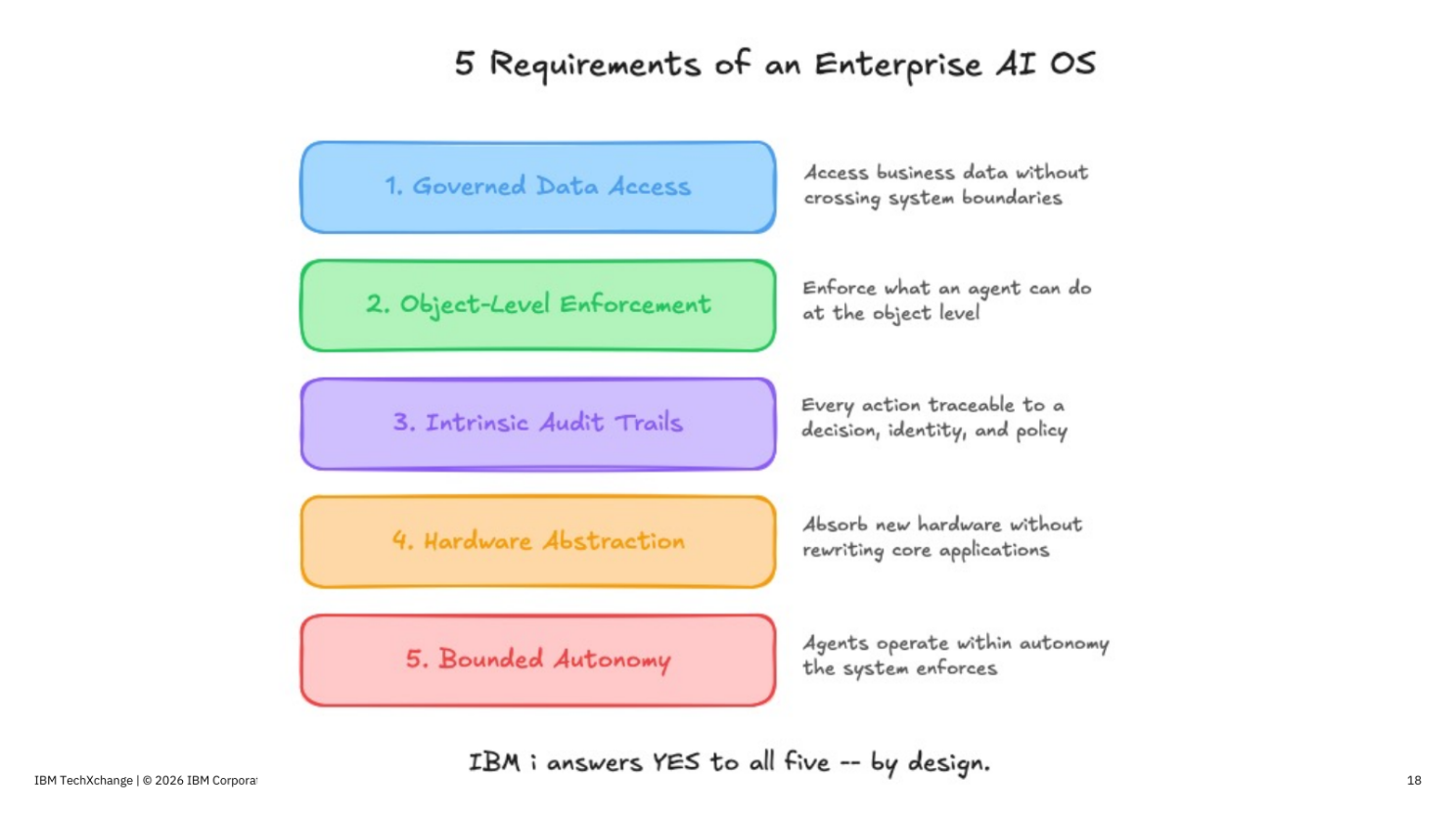
This is why I describe IBM i as the first “agent-native” operating system. Agents built on these architectural foundations can do real operational work.
Building an agent for IBM i
The connection layer: Mapepire
SQL is an awesome tool, but the agent needs a way to connect to a system and run SQL. Mapepire is a server job on IBM i that accepts encrypted connections on a single port, with client SDKs for Python, Node.js and Java.
In Python, the mapepire-python client gets you from a connection to query results in a few lines. SQLJob opens the connection to the Mapepire server. On top of that sits a small helper, run_sql, which binds any parameters, runs the statement and caps the number of rows that come back. The tools we build next all use this helper.
from mapepire_python import DaemonServer
from mapepire_python.client.sql_job import SQLJob

server = DaemonServer.from_env()  # host, user, password
job = SQLJob()
job.connect(server)

def run_sql(sql, params=None, rows=50):
    opts = {"parameters": params or []}
    with job.query(sql, opts=opts) as q:
        return q.run(rows_to_fetch=rows).data
The layers of an agent
The clearest way to see what each piece of an agent contributes is to build one a layer at a time. The example here is an IBM i agent in Python with Agno, an open-source framework for building agents. Each layer adds a few lines to the one before it.
Layer 1: a model, instructions and one tool
A tool is just a function: a SQL statement with parameters, plus a docstring (or description) of what the tool does. The model uses that description to decide how to use the tool.
@tool
def monthly_revenue(year: int) -> str:
    """Revenue, profit and order count for each month of a year,
    from the TOYSTORE3 sales data."""
    return run_sql(
        """SELECT MONTH, TOTAL_REVENUE_W_TAX AS REVENUE,
                  TOTAL_PROFIT_W_TAX AS PROFIT, ORDER_COUNT
             FROM TOYSTORE3.MQT_MONTHLY_REVENUE_SUMMARY
            WHERE YEAR = ?
            ORDER BY MONTH""",
        [year],
    )
An agent is that tool plus a model and instructions. Agno’s Agent class makes it easy to put them together:
sales_agent = Agent(
    model=Claude(id="claude-sonnet-5-5"),
    instructions=(
        "You answer questions about a toy store's sales. "
        "Answer only from your tools, with the numbers."
    ),
    tools=[monthly_revenue],
)

sales_agent.print_response(
    "What were the best and worst months of 1997, and by how much?"
)
That’s a working agent. To answer the question, the model calls monthly_revenue(1997), reads the twelve rows that come back, and compares them. The model only picks the year. The SQL is fixed, which makes this the safest kind of tool, and for many tasks it’s all you need.
Layer 2: let the agent write its own SQL
Fixed tools only answer the questions you thought of in advance. For everything else, the agent needs to write its own SQL, and it needs guardrails while it does. The IBMiSQLToolkit gives the agent a small set of tools that follow the order an experienced developer works in. It finds the right tables and data it has access to and describes their columns. Then it generates an SQL statement, checks the statement with QSYS2.PARSE_STATEMENT, which rejects anything that isn’t a read-only query, and runs it with a row cap. If the check fails, the error goes back to the model so it can fix the statement.
toolkit = IBMiSQLToolkit(server)

agent = Agent(
    model=Claude(id="claude-sonnet-5-5"),
    instructions=INSTRUCTIONS,
    tools=[toolkit],
)
The IBMiSQLToolkit is an example of progressive disclosure, a popular technique for database agents. All the code is in the repo linked at the end.
Layer 3: give it an administrator’s know-how with skills
A model knows SQL, but it doesn’t know how your best administrator runs a security review. Skills hold that knowledge. A skill is a folder with a SKILL.md file and optional reference files. The agent sees only each skill’s name and one-line description until a task matches. Then it loads the full instructions. Loading skills from a skills folder takes one line:
agent.skills = Skills(loaders=[LocalSkills("skills/")])The repo has two: ibmi-performance and ibmi-security. The security skill follows Scott Forstie’s “Inject more security into Db2 for i”. It maps each risk, such as profiles anyone can impersonate, files any user can change, and weak passwords, to the SQL service that finds it, with tested queries in a reference file. The skill tells the agent to start from those tested queries instead of writing new ones.
Layer 4: identity, approval, audit and memory
The last layer is what you need before an agent changes anything: it should know who it is, ask before it acts, and leave a record.
First, tell the agent who it is. profile_context runs once at startup and reads the agent’s own user profile from QSYS2.USER_INFO: its name, special authorities, group profile and home directory. Those go into the model’s context through additional_context. When someone asks about “my jobs” or “my files”, the agent knows which profile that means, and it knows what that profile is allowed to do before it tries.
agent = Agent(
    name="IBM i Agent",
    model=Claude(id="claude-sonnet-5-5"),
    instructions=INSTRUCTIONS,
    # add profile information to context
    additional_context=profile_context(toolkit),
    tools=[toolkit],
    skills=Skills(loaders=[LocalSkills("skills/")]),
)
Next, make certain changes wait for human approval. A tool marked requires_confirmation pauses the run and shows the call to a person, who approves or rejects it. Here the tool runs a SQL statement that changes data or authority, and the person sees the exact statement the agent wrote before it runs:
@tool(requires_confirmation=True)
def run_sql_change(statement: str) -> str:
    """Run one SQL statement that changes data, such as UPDATE or REVOKE."""
    ...

run = agent.run(
    "Remove public update access from the TOYSTORE3 tables any user can change"
)
for req in run.active_requirements:
    if req.needs_confirmation:
        print(req.tool_execution.tool_args)  # the REVOKE statement the model wrote
        req.confirm()                        # or req.reject()
run = agent.continue_run(run_id=run.run_id, requirements=run.requirements)
The for loop at the end handles the confirmations: the agent loop is interrupted, and the tool call waits until it is approved.
A tool hook logs every call with its arguments, and a database keeps the conversation history. Put together, the whole agent is still one Agent object:
def audit_sql(function_name, func, args):
    log.info("tool=%s args=%s", function_name, args)
    return func(**args)

agent = Agent(
    name="IBM i Agent",
    model=Claude(id="claude-sonnet-5-5"),
    instructions=INSTRUCTIONS,
    additional_context=profile_context(toolkit),
    tools=[toolkit],
    skills=Skills(loaders=[LocalSkills("skills/")]),
    # store agent session information in its own db
    db=SqliteDb(db_file="agent.db"),
    add_history_to_context=True,
    # function that runs on each tool call
    tool_hooks=[audit_sql],
    tool_call_limit=20,
)
The audit_sql hook records every SQL statement the agent runs. On IBM i, a database monitor can also capture the SQL statements run by the agent’s user profile, so you can audit activity at both the agent level and the IBM i level.
The user profile stays the same through every layer, and its authority is the hard limit. If the model tries something the profile isn’t allowed to do, the statement fails, even if it is approved.
Choosing a model, and running one on IBM i
The layers above don’t depend on a particular model. For the most part, agents are “model agnostic,” meaning that the core agent can run with any LLM. This is useful because building an agent really comes down to figuring out what problems you want to solve, what data you can use, and how you want the agent to behave.
This means you can build your agent and then test and evaluate it across models and deployment configurations without rebuilding it for each model. Choosing which model to use is still an important decision.
There are two main camps: using a third-party provider (like Anthropic, OpenAI or OpenRouter), or hosting the model yourself.
Each has pros and cons. Hosted models through an API are easy to set up, but some shops can’t send data off the system. Self-hosted models require you to manage compute resources and the full model stack. Luckily, there is a vibrant local LLM developer community.
You can run a model on IBM i itself with llama.cpp, which is plain C/C++ and runs in PASE without a GPU. llama.cpp comes with llama-server, which exposes a model through an OpenAI-compatible API, so you can call it from SQL with QSYS2.HTTP_POST. The SQL is essentially a curl request:
VALUES JSON_VALUE(
  QSYS2.HTTP_POST(
    DEMO.LLM_BASE_URL CONCAT '/chat/completions',
    JSON_OBJECT(
      'model'    VALUE DEMO.LLM_MODEL,
      'messages' VALUE JSON_ARRAY(
        JSON_OBJECT('role' VALUE 'user',
          'content' VALUE
            'What does CPF1164 mean?') FORMAT JSON
      ) FORMAT JSON),
    JSON_OBJECT('headers' VALUE JSON_OBJECT(
      'Authorization' VALUE 'Bearer '
        CONCAT DEMO.LLM_API_KEY) FORMAT JSON)),
  '$.choices[0].message.content');
And the model’s answer comes back as the query result:
CPF1164 is the completion message IBM i logs when a job ends.
It records when the job ended, how many CPU seconds it used, and an end code: 0
means it ended normally.
This pattern is extremely useful. Again with the power of SQL, you can embed local LLM inference directly into SQL workloads.
Standardizing tools with MCP
The tools we built earlier live inside one Python agent, so only that agent can use them. When a second team builds a second agent, they rewrite the same tools. MCP standardizes this. It’s an open protocol for exposing tools, so the tools live in one server that any client can connect to.
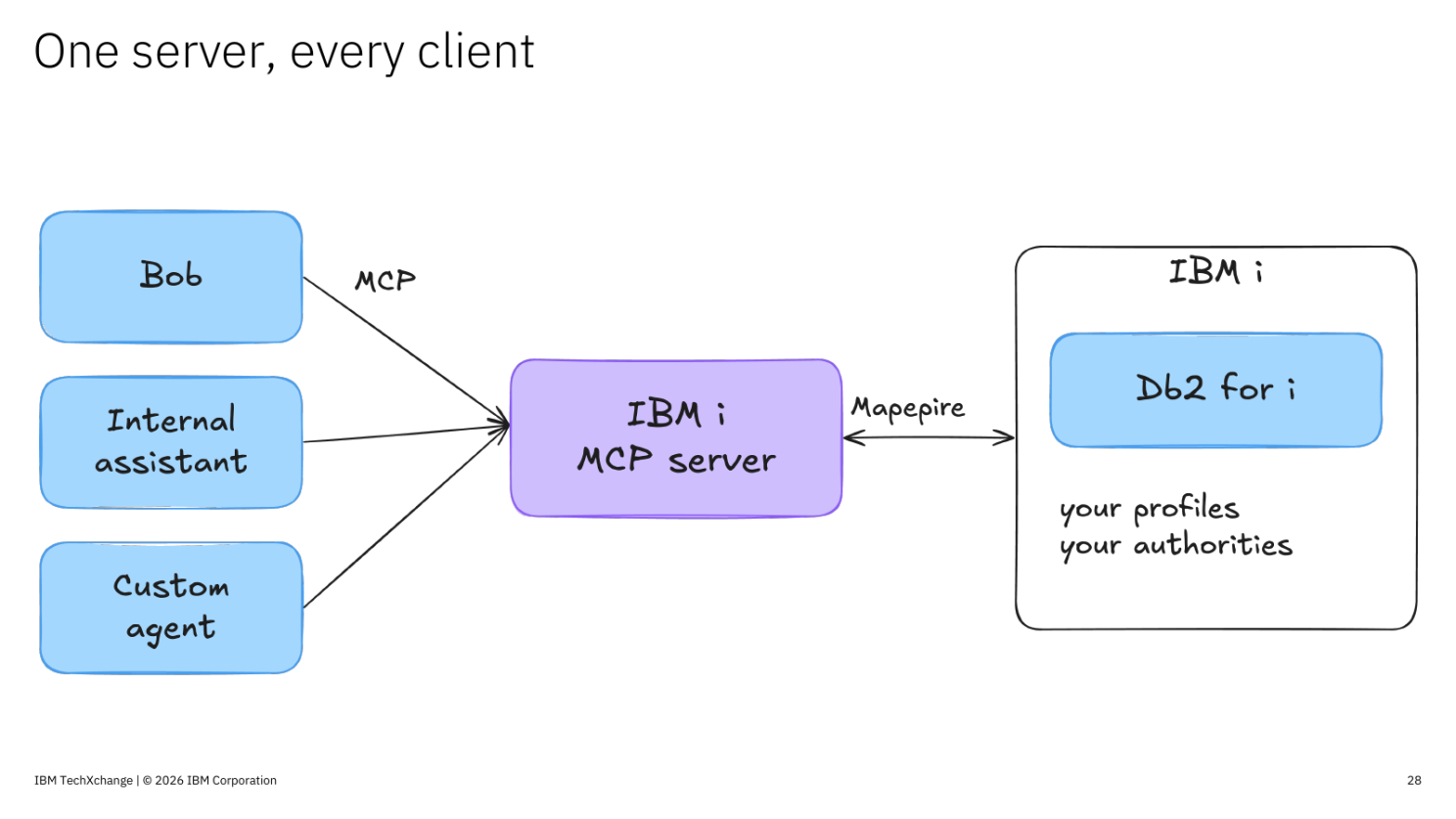
The IBM i MCP server defines each tool in YAML instead of Python. Here is the monthly_revenue tool from the agent, written as an MCP tool:
tools:
  monthly_revenue:
    source: ibmi-system
    description: >-
      Revenue, profit and order count for each month of a year,
      from the TOYSTORE3 sales data.
    statement: |
      SELECT MONTH, TOTAL_REVENUE_W_TAX AS REVENUE,
             TOTAL_PROFIT_W_TAX AS PROFIT, ORDER_COUNT
        FROM TOYSTORE3.MQT_MONTHLY_REVENUE_SUMMARY
       WHERE YEAR = :year
       ORDER BY MONTH
    parameters:
      - name: year
        type: integer
        description: The year to report on
        required: true
    security:
      readOnly: true
The SQL is the same statement the Python tool ran, with a named :year parameter. Everything around it tells the server how to use that statement: which system to connect to, how to describe the tool to the model, what parameters it takes, and that it only reads data. There’s no server code to write, so building a tool comes down to writing the SQL. If you can write a query, you can build a tool.
Bob, Claude, VS Code and custom agents all see the same tool, and every call runs as an IBM i user profile through Mapepire. You can serve a curated set of tools like this one, or enable the built-in text-to-SQL toolset, which uses progressive disclosure. It includes tools for exploring the database and running queries, with its own guardrails.
Try it yourself
Everything behind this article is in one repo: the slides from all six sessions, demo recordings, and five demos you can run against your own IBM i, each with setup steps.
github.com/ajshedivy/IBMTechXchange2026
Each demo lines up with a part of this article:
- mapepire-notebook: connect to Db2 for i from Python and run queries through Mapepire.
- sql-services-agent: run SQL services in a notebook, turn the same SQL into tools, and give them to agents.
- sql-agents: the text-to-SQL agent built on
IBMiSQLToolkit. - llama-cpp-on-ibm-i: run a model on IBM i with llama.cpp and call it from SQL.
- mcp-tool-builder: build YAML SQL tools with Bob and test them in MCPJam Inspector.
If you were at one of the sessions at TechXchange, thanks for coming and for the questions. If you build something with this, I’d like to hear about it.